Runway USA
A pilot's guide to destination cities in Flight Simulator
by Charles Gulick
IBM PCjr Aircraft Controls
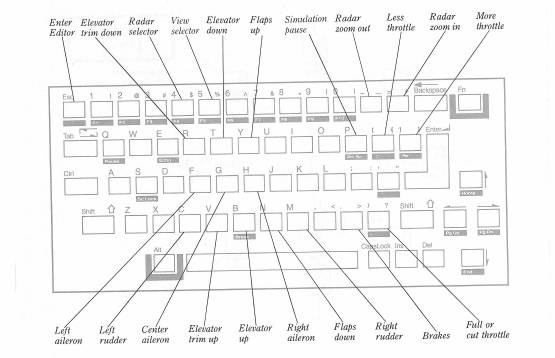
| For additional controls, press SHIFT and one of these keys: | |
| Keys | Result |
| SHIFT-A | Sets the altimeter to the current barometric pressure |
| SHIFT-C | Sets the COM radio frequency |
| SHIFT-D | Sets the heading indicator (directional gyro) to the magnetic compass |
| SHIFT-G | Raises or lowers the landing gear |
| SHIFT-L | Toggles the instrument and running lights on or off |
| SHIFT-N | Sets the NAV radio frequency |
| SHIFT-T | Sets the transponder “squawk” |
| SHIFT-V | Sets the OBI to a VOR frequency |
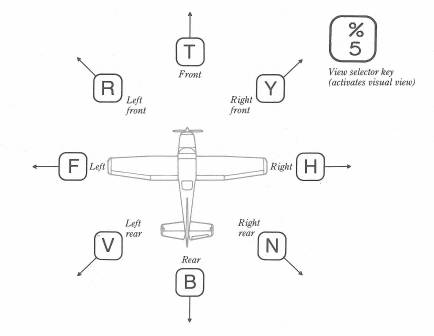
View Selector Controls for the IBM PCjr
| For the following controls, enter the Editor and press one of these keys: | |
| Key | Result |
| Ins | Saves the current flight parameters to mode library |
| S | Saves the mode library to disk |
| PrtSc | Loads the flight parameters from mode library |
| L | Recalls mode library from disk |
Table of Contents | Previous Chapter | Next Chapter